The meado TMS is a single source of truth for high growth transport operations
The meado TMS is fully integrated into our solver service, allowing automated route planning and load building. Automated planning is based on your business rules and constraints and is fully configurable to your business. The outcome is less manual intervention, higher route efficiency and lower overall cost.
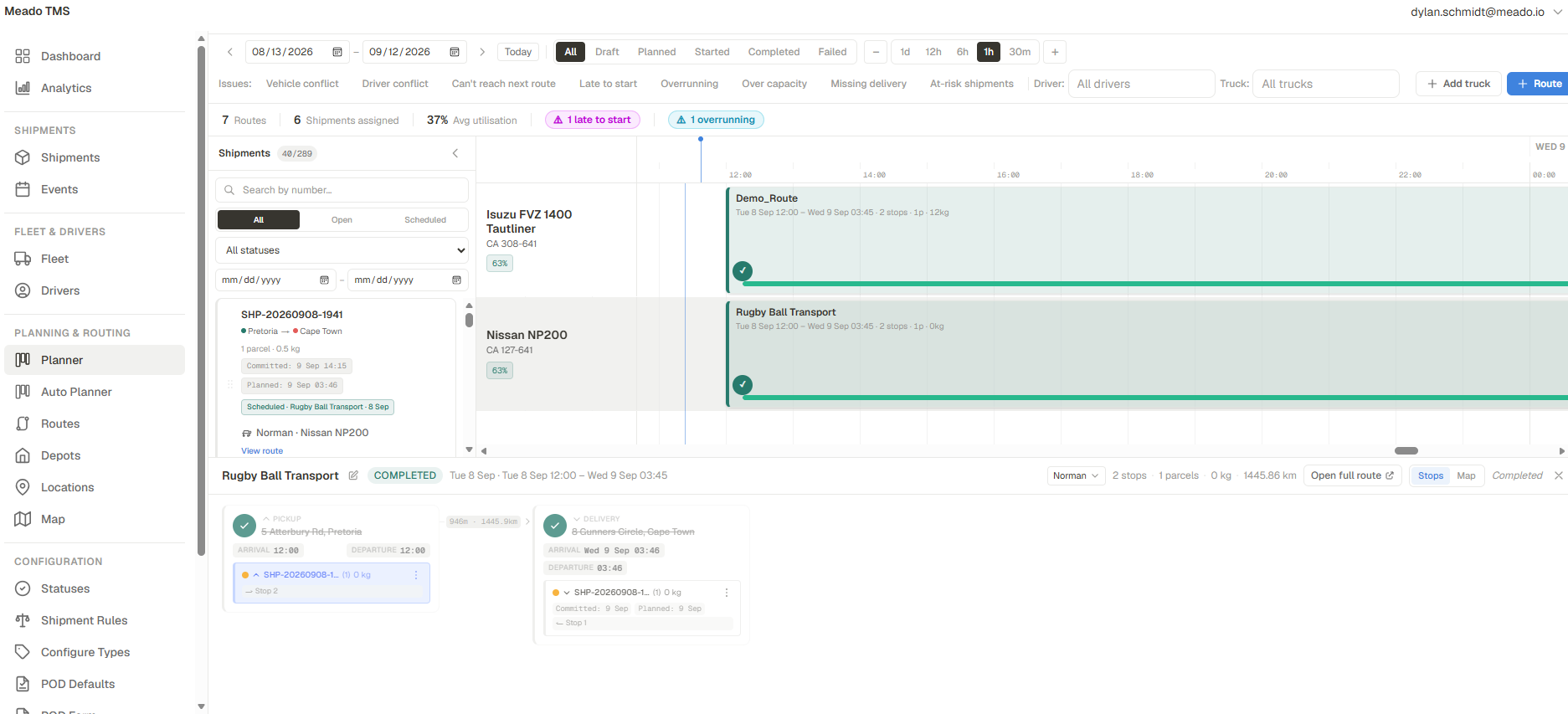
This is the planner, and it is dense on purpose. Every conflict, every unassigned shipment and every vehicle's day sit in one place, so you're not jumping around between three pages to find out whether everything is scheduled for tomorrow.
Pick a number to read that part.Drag the board sideways to see all of it.
Eight named conflicts work as live filters. They include driver and vehicle clashes, stops that can't be reached, late starts, overruns and vehicles over capacity.
You can pick a date range, filter by status, and zoom the timeline from a whole day down to thirty minutes.
The counters show routes, assigned shipments and average utilisation for the window you're looking at, with warnings beside them.
Every shipment can be searched by number, and each one shows its committed time against its planned time.
Each truck has its own row showing its make, plate, utilisation and routes against the clock.
Stops are listed in order, with arrival and departure times, leg distance and the documents each stop still needs.
You set up your own statuses, rules, document types, POD forms, depots and locations without having to log a support ticket.
Eight named conflicts sit across the top of the planner. Driver and vehicle clashes, stops that can't be reached, late starts, overruns, over capacity, missing deliveries. Each one works as a live filter, and the counters underneath update to match whatever window you have open.


Each shipment carries its origin and destination, parcels and weight, the route it's scheduled onto and who's taking it. The two rows that matter most are Committed, which is what you promised the customer, and Planned, which is what today's plan will actually do. If they disagree, you see it here while there is still time to change the plan.
You can search by shipment number and filter by open, scheduled or any status you have defined yourself.
Each vehicle in the fleet and all its planned activities are depicted along a timeline, allowing you to instantly understand its workload, as well as its adherence against plan.

Open a route and you get its stops in driving order. Pickup and delivery, arrival and departure, the distance of each leg, the shipments on board, and which documents each stop still owes. The driver's app reads from the same record, so the planning office and the driver always see the same route.


The planner's own navigation.
Much of the TMS is set up once and then left to run. You decide how routes get planned, what a driver has to capture for each shipment type before leaving a stop, what the proof of delivery form asks for, and which statuses exist.
Every unassigned shipment is sent to the solver along with your constraints, and optimised routes come back in a few minutes. Planning runs on a commercial solver.
Unassigned
Solver
Commercial solver
Planned
Isuzu FVZ 1400
Nissan NP200
For each shipment type, you decide what a driver must capture before a stop can be closed, and the app won't let the driver close the stop until it has been captured.
Shipment type
Palletised freight
Requires
Build the form each stop asks for out of the fields you need. Set defaults once for everything else.
Fields
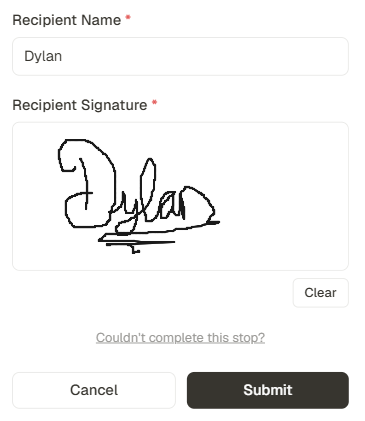
Recipient Name *
Recipient Signature *
Utilisation, on-time performance and volumes are reported from the same records the planner uses.
Every change is logged with a timestamp, so you can see what changed, who changed it and when.
Each vehicle is stored with its capacity, body type and registration.
Each driver's profile shows when they are available, what they are licensed to drive and which language their app uses.
Depots are where routes start and end, and each delivery address is stored once and reused.
You can set up your own shipment statuses and document types to match how you already work.
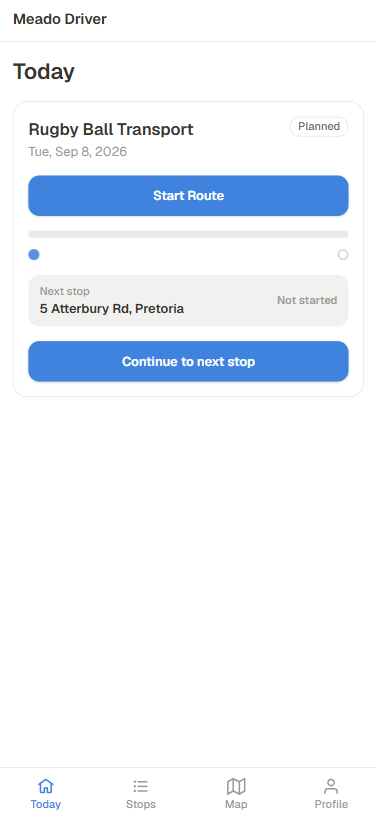
The driver sees one screen at a time, and each button says what it does. Drivers don't build routes or pick statuses, so there is very little to learn. Whatever the office has configured shows up as the next step in the app.

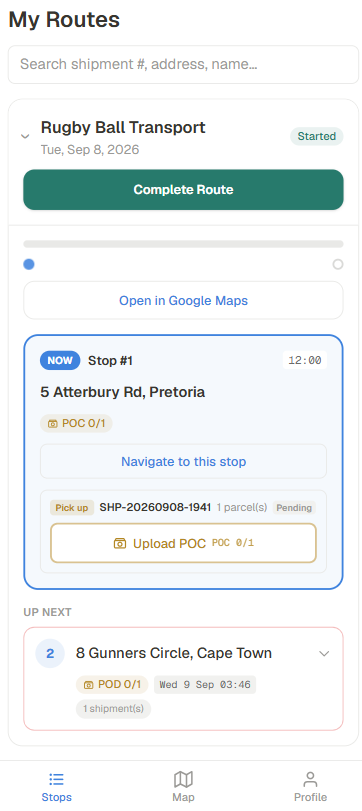
The driver sees today's route and a single button to start it.

The current stop is marked NOW and shows the address, the time and what still needs to be captured. The next stop is listed underneath.

The driver captures the recipient's name and a signature on the screen. The form only shows the fields the office added to it.

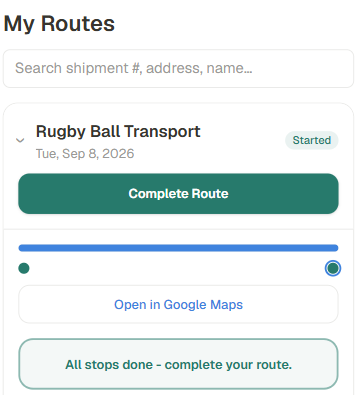
Once every stop is done, the app says so. The driver completes the route and the office sees it at the same moment.

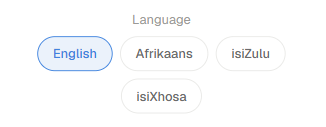
The app is available in English, Afrikaans, isiZulu and isiXhosa, and the language is set for each driver.
Couldn't complete this stop? captures a reason against the stop, so there is a record of what happened.
Drivers get in-app turn by turn navigation to ensure the best, lowest cost route is always followed.
We'll show you how the TMS and the driver app fit into your dispatch and tracking workflow.